SSN DEV Studio

꾹

할 일 목록은 다 하면 지워져요. 꾹은 반대예요. 해낸 날에 도장이 하나씩 남아요.
App Store에서 받기 iPhone · iOS 18 이상 무료 · 광고 포함 · 인앱 구입
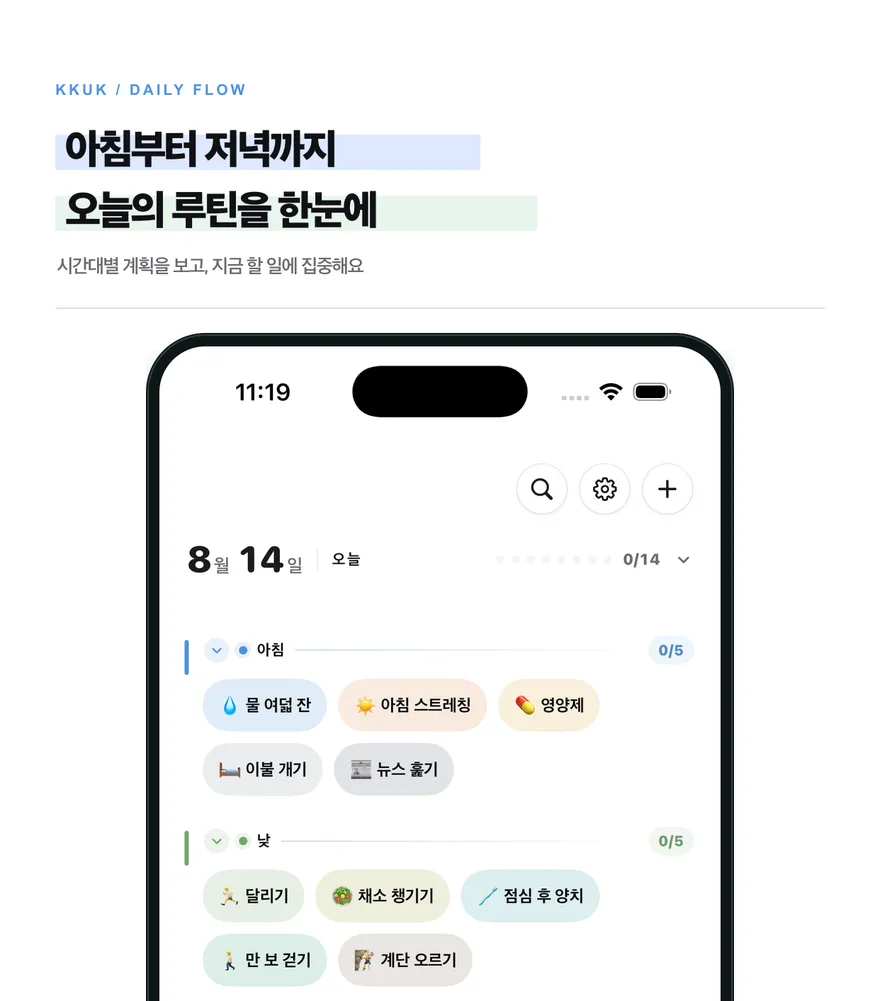
꾹 오늘 화면

오늘 도장 하나 꾹

앱을 열지 않고 찍어요

앱을 한 번 열면 오늘 도장판이 잠금화면과 다이나믹 아일랜드에 떠요. 한동안은 앱으로 돌아가지 않아도 거기서 바로 꾹 찍을 수 있어요. 홈 화면 위젯의 도장을 눌러서 찍어도 돼요.

꾹 눌러야 찍혀요

탭 한 번으로 지나가지 않아요. 손가락을 올리고 잉크가 다 찰 때까지 기다리면 도장이 찍혀요. 잘못 눌렀으면 손가락을 옆으로 밀어서 취소해요.

내 도장 만들기

  • 32가지 색과 이모지로 나만의 도장을 만들어요.
  • 무슨 요일에 몇 번 할지, 어느 그룹에 넣을지, 몇 시에 알림을 받을지 도장마다 따로 정해요.
  • 「30일 채우기」, 「100번 채우기」처럼 완주할 목표를 걸어 둘 수도 있어요.

쌓인 기록 보기

  • 달력: 이번 달에 찍은 도장을 한 판에서 봐요.
  • Journal: 도장 옆에 그날의 메모와 사진을 남겨요.
  • 리포트: 주·월·연 단위로 얼마나 지켰는지 봐요. 보고 있는 기간을 CSV 파일로 내보낼 수 있어요.
  • 월간 리뷰: 매달 지난달을 돌아봐요.

앱 밖에서도

  • 홈 화면 위젯 7가지: 오늘 도장 · 최근 체크인 · 달력 · 위클리 리포트 · 먼슬리 리포트 · 그룹 위클리 · 큰 달력
  • Apple Watch: 손목에서 오늘 도장을 찍고, 워치 페이스의 컴플리케이션으로 오늘 얼마나 했는지 봐요.
  • 한글 서체 16가지, 밝게 · 어둡게 · 기기 설정 따라가기. 세로 화면 전용이에요.

무료로 쓸 수 있어요

  • 도장 3개, 그룹 3개, 최근 30일 기록, 이번 주와 이번 달 리포트, 「오늘 도장」 위젯까지 무료예요.
  • 광고를 끝까지 보면 도장을 하나 더 만들 수 있고, 그렇게 늘린 자리는 그대로 남아요.

꾹 프리미엄

  • 도장과 그룹 무제한
  • 30일보다 오래된 기록까지 전부
  • 지난 리포트와 지난 월간 리뷰
  • 쉬어가기: 쉬는 날을 정해도 연속은 그대로
  • 위젯 7가지 전부, 잉크 96색 전부
  • iCloud 동기화로 다른 기기에서도 이어서
  • 광고 없이
  • 월간 또는 연간 구독(자동 갱신)

기록은 기기에 남아요

도장과 메모, 사진은 사용자의 기기에 저장돼요. 계정도 로그인도 없어요. iCloud 동기화는 기본으로 꺼져 있고, 켜면 사용자 본인의 iCloud 비공개 데이터베이스로만 복제돼요. 개발자는 이 기록을 읽을 수 없고 별도의 서버에 보관하지 않아요.
도움이 필요하세요?

KKUK

A to-do list erases what you finish. KKUK does the opposite: every day you follow through leaves one more stamp.

Download on the App Store iPhone · iOS 18 or later Free · Ads · In-app purchases
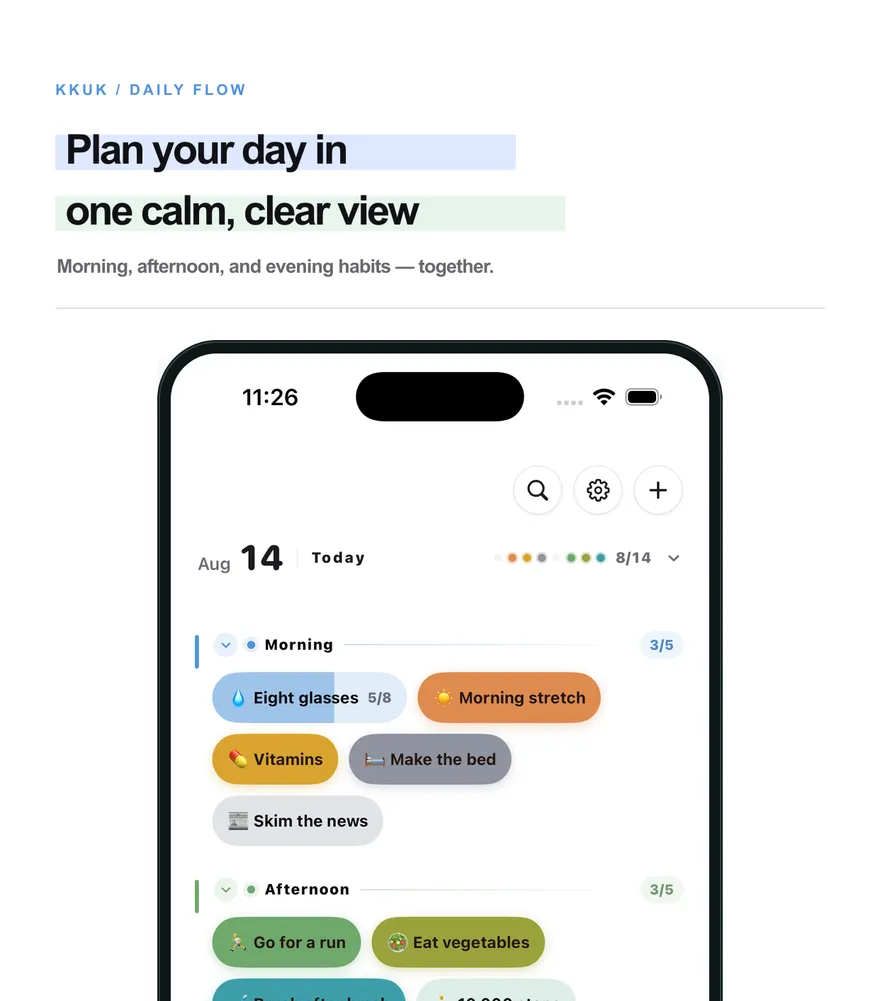
KKUK Today screen

Press one stamp today

Without opening the app

Open the app once and today's board appears on the Lock Screen and in the Dynamic Island. For a while after that you can press a stamp right there, without going back to the app. You can also press one from a Home Screen widget.

A press, not a tap

One quick tap won't do it. Hold your finger until the ink fills all the way, and the stamp lands. Slide your finger aside to cancel a press you didn't mean.

Make your own stamp

  • Build a stamp from 32 colors and an emoji.
  • Which weekdays, how many times a day, which group it belongs to, and when it should remind you: set all of it per stamp.
  • Give a stamp a finish line, like 30 days or 100 times.

See what you've kept

  • Calendar: every stamp you pressed this month on a single board.
  • Journal: leave a note and a photo beside the stamp.
  • Report: see how well you kept up by week, by month, and by year. The period you're looking at can be exported as a CSV file.
  • Monthly review: look back on the month that just ended.

Beyond the app

  • Seven Home Screen widgets: Today's Stamps · Recent check-ins · Calendar · Weekly report · Monthly report · Group weekly · Large calendar
  • Apple Watch: press today's stamps on your wrist, and check today's progress with a complication on your watch face.
  • Twenty bundled typefaces (four for Latin text, sixteen Korean). Light, dark, or follow your device. Portrait only.

Free to use

  • 3 stamps, 3 groups, the last 30 days of records, this week's and this month's report, and the Today's Stamps widget.
  • Watch a rewarded ad all the way through to add one more stamp, and the slot you earned stays yours.

KKUK Premium

  • Unlimited stamps and groups
  • Every record, including anything older than 30 days
  • Past reports and past monthly reviews
  • Rest days that keep your streak going
  • All seven widgets and all 96 ink colors
  • iCloud sync to continue on another device
  • No ads
  • Monthly or yearly subscription (renews automatically)

Your records stay on your device

Stamps, notes, and photos are stored on your device. There is no account and no sign-in. iCloud sync is off by default, and when you turn it on, records are copied only to your own private iCloud database. The developer cannot read them and does not keep them on a separate server.

Need help?

KKUK

To-Doリストは、終わらせたら消えていきます。KKUKは反対です。やり遂げた日にスタンプがひとつずつ残ります。

App Store でダウンロード iPhone · iOS 18 以降 無料 · 広告あり · アプリ内課金
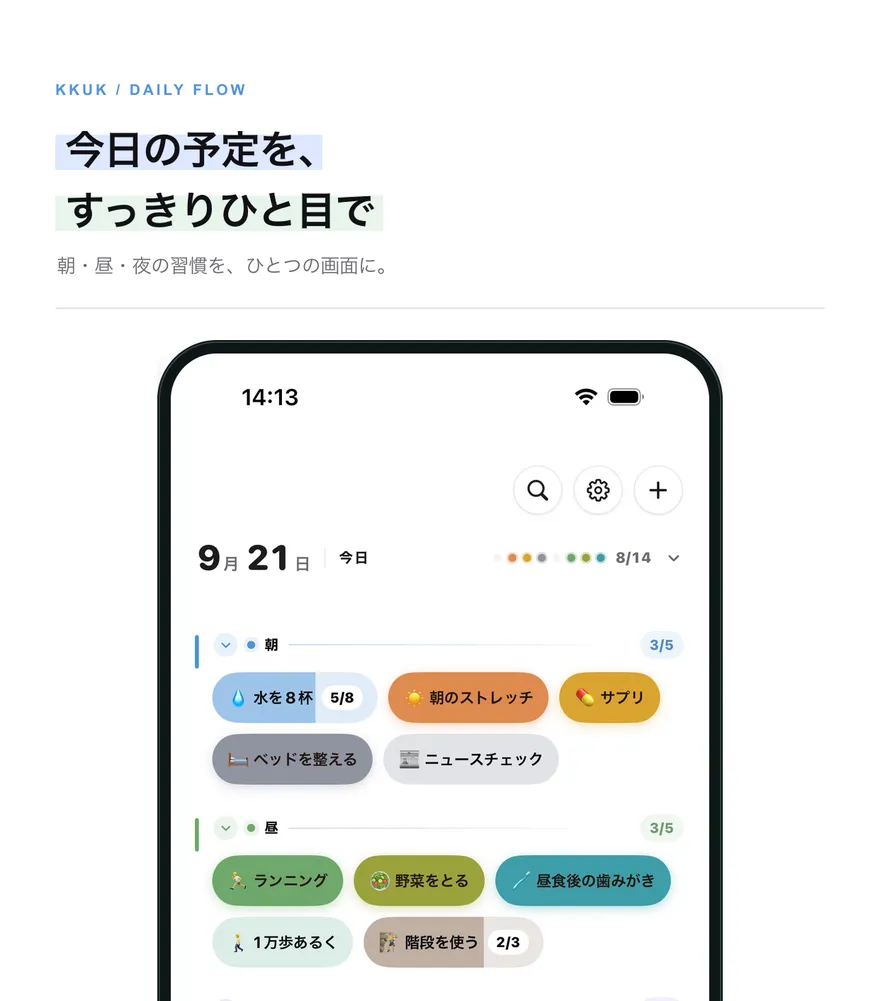
KKUKの今日の画面

今日のスタンプをひとつ

アプリを開かずに押せます

アプリを一度開くと、今日のスタンプカードがロック画面とDynamic Islandに表示されます。しばらくはアプリに戻らなくても、そこからそのままスタンプを押せます。ホーム画面のウィジェットから押すこともできます。

ぎゅっと押してはじめて押されます

一度タップしただけでは押されません。指を置いたまま、インクがいっぱいになるまで待つとスタンプが押されます。押し間違えたときは、指を横にずらすとキャンセルできます。

自分だけのスタンプを作る

  • インクの色と絵文字で、自分だけのスタンプを作れます。
  • 何曜日に何回やるか、どのグループに入れるか、何時にリマインダーを受け取るかをスタンプごとに決められます。
  • 「30日」「100回」のように、完走までの道のりを決めておくこともできます。

積み重ねた記録を見る

  • カレンダー:今月押したスタンプを1枚で見られます。
  • Journal:スタンプの横に、その日のメモと写真を残せます。
  • Report:週・月・年ごとに、どれだけ続けられたかを見られます。表示中の期間はCSVファイルで書き出せます。
  • 月間レビュー:毎月、先月を振り返ります。

アプリの外でも

  • ホーム画面ウィジェット7種類:今日のスタンプ・最近のチェックイン・カレンダー・ウィークリーレポート・マンスリーレポート・グループウィークリー・大きなカレンダー
  • Apple Watch:手首で今日のスタンプを押せます。文字盤のコンプリケーションで今日の進み具合を確認できます。
  • ライト・ダーク・端末の設定に合わせる、から選べます。縦向き専用です。

無料で使えます

  • スタンプ3個、グループ3個、直近30日の記録、今週と今月のレポート、「今日のスタンプ」ウィジェットまで無料です。
  • 広告を最後まで見るとスタンプをもう1個作れて、増やした枠はそのまま残ります。

KKUK プレミアム

  • スタンプとグループが無制限
  • 30日より前の記録もすべて
  • 過去のレポートと過去の月間レビュー
  • ひと休み:休んでも連続はそのまま
  • ウィジェット7種類すべて、インク96色すべて(無料は32色)
  • iCloud同期で別のデバイスでも続きから
  • 広告なし
  • 月間または年間のサブスクリプション(自動更新)

記録はデバイスに残ります

スタンプ、メモ、写真はお使いのデバイスに保存されます。アカウントもログインもありません。iCloud同期は初期設定でオフになっており、オンにすると、ご本人のiCloudのプライベートデータベースにだけ複製されます。開発者はこの記録を読むことができず、別のサーバーにも保管しません。

お困りですか?